
Overview
The User Code (C#) object in the SharpBot Math library allows advanced users to embed custom C# logic directly into the SharpBot execution engine.
This object provides a controlled, deterministic, and scan‑based runtime environment.
The User Code object is implemented as a code wrapper with a fixed lifecycle, enabling users to implement custom calculations, maintain internal state, and extend mathematical logic without external scripting or services.
Key Capabilities
- Custom mathematical and logical calculations
- Persistent internal memory between scans
- Deterministic execution at a defined scan rate
- Automatic input/output limit checking
Code Structure
The User Code (C#) object’s code consists of four main sections:
- Using directives and execution context, including global variable declarations (persistent memory)
- Lifecycle method 1, BeginCalculate()
- Lifecycle method 2, Calculate()
- Lifecycle method 3, EndCalculate()
Each section executes at a specific point in the SharpBot runtime.
1. Using Directives and Execution Context

using System;  //  ... and any other using directives....
// variables from tables above are available in this code window
// any additional object variables are defined here
// these variables are global, have a permanent memory and can be used in the functions below
// feel free to delete instructions once you know how to use the object!Description
This section defines which .NET namespaces are available to the User Code object.
Important Notes
Systemis included by default- Only namespaces supported by the SharpBot runtime are allowed, no list is currently available
- Code executes inside a sandboxed environment for safety and stability
2. Global Variables and Persistent Memory

int i;
double myVarX, sum;Description
Variables declared outside the lifecycle methods are treated as global object variables.
Characteristics
- Persist for the lifetime of the object
- Retain values between execution scans
- Accessible from all lifecycle methods
Typical Use Cases
- Counters and timers
- Integrators and accumulators
- Internal model or filter states
- State machines and flags
Inputs and Outputs
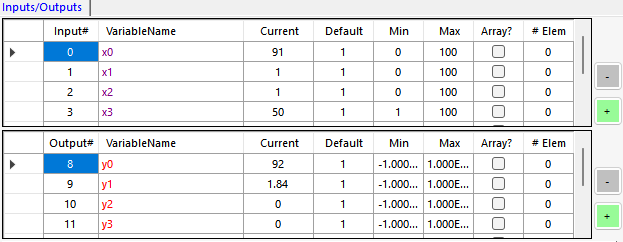
- Object connector’s inputs (
x0,x1,x2, …) and outputs (y0,y1, …) are automatically available - These variables must not be redeclared by the user
- The names can be changed by the user
3. Lifecycle Methods
The User Code object follows a strict execution lifecycle to ensure deterministic behavior.
3.1 BeginCalculate() — Initialization Phase

public void BeginCalculate()
{
	// use this method to initialize any variable values (e.g. sum = 0)
}Description
Executed once at startup before the first calculation scan.
Typical Uses
- Initialize global variables
- Reset internal states
- Define initial conditions for models or algorithms
Execution Frequency
- Called once per execution cycle
- Not executed on every scan
3.2 Calculate() — Main Execution Loop
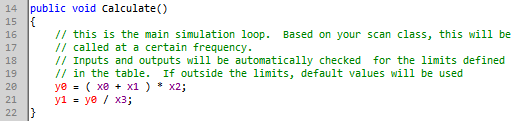
public void Calculate()
{
	// this is the main simulation loop.  Based on your scan class, this will be
	// called at a certain frequency.
	// Inputs and outputs will be automatically checked  for the limits defined
	// in the table.  If outside the limits, default values will be used
	y0 = ( x0 + x1 ) * x2;
	y1 = y0 / x3;
}Description
The main execution method that runs cyclically according to the configured Scan Class.
Key Characteristics
- Executes at a deterministic, fixed scan rate
- Behaves similarly to a PLC scan or APC execution step
- All inputs and outputs are automatically:
- Checked against configured engineering limits
- Replaced with default values if limits are exceeded (pick limits carefully)
Typical Uses
- Core mathematical calculations
- Model equations
- Signal processing and conditioning
- Control and decision logic
3.3 EndCalculate() — Termination Phase

public void EndCalculate()
{
	// this method is called at the end of the simulation
}Description
Executed once when the simulation stops or the object is unloaded.
Typical Uses
- Final calculations
- Graceful shutdown logic
- Optional diagnostics or cleanup
This method is optional and not required for most applications.
Execution Flow
The complete runtime sequence for the User Code object is shown below:
Start├─ BeginCalculate()├─ Calculate() (executed repeatedly at scan rate)├─ Calculate()├─ Calculate()└─ EndCalculate()End
Conceptual Model
The SharpBot User Code (C#) object can be conceptually viewed as:
- A PLC function block with internal memory
- A custom Math block with persistent state
- A lightweight algorithm container embedded in the APC layer
It is designed for logic that must run during simulation with guaranteed timing and reproducibility.
Best Practices
- Initialize all persistent variables in
BeginCalculate() - Keep
Calculate()logic deterministic and scan‑safe - Avoid heavy or blocking computations
- Use table limits for input validation
- Treat global variables as state memory, not temporary variables
Summary
The User Code (C#) object is a powerful extension mechanism for the SharpBot Math library. By combining persistent memory, deterministic execution, and seamless I/O integration, it enables advanced users to implement custom logic while preserving system performance, stability, and control integrity.
*This article was written by me, then rewritten using AI, then edited by me. Walter Eskuche, not a writer.